Text synthesis
Split text into sentence segments and highlight the active segment. Choose playback, saving or both, including alternating male/female conversation mode.
Speech synthesis & scripts
Turn scripts into voices, and voices into usable data.
Synthesize text and XLSX scripts with Supertonic TTS. Set voice, speed and pauses per speaker, then export segments, combined audio and timestamp reports.
Installers and source code are currently private.
 View larger
 Speech synthesis & scripts
A Windows application for managing Supertonic TTS production. Create narration or multi-speaker conversations and connect audio with script timing for STT evaluation datasets and audiobook workflows.
WHAT YOU CAN DO
Split text into sentence segments and highlight the active segment. Choose playback, saving or both, including alternating male/female conversation mode.
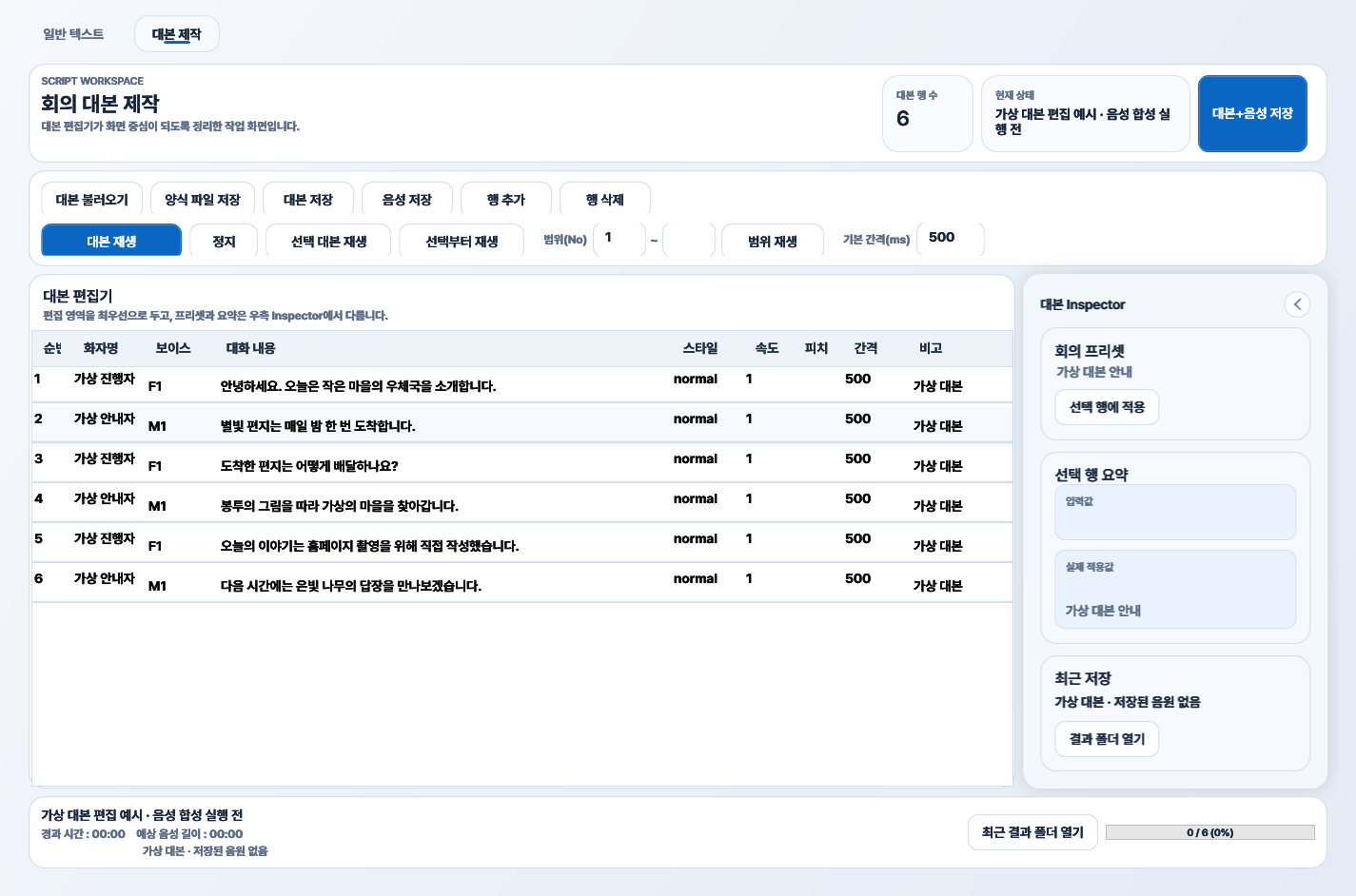
Import scripts, add or remove rows, and edit speakers, text and voice IDs. Header-based mapping supports the original seven-column template and optional Style/Pitch columns.
Choose male M1–M5 and female F1–F5 voices with per-row speed. Style values and text/remark tags assist recommended speed and pauses.
Insert actual PCM silence after each row. Empty, AUTO or -1 pause values use the default; explicit values take priority.
Save segment audio, a combined track and timestamp reports together. Use WAV, or MP3/FLAC when FFmpeg is available.
Stream long combined audio to disk rather than accumulating all PCM in memory. Save edited scripts or blank XLSX templates.
IN YOUR EVERYDAY LIFE
Import your text, choose a voice and preview speech to review wording and pauses. Saved audio can serve as material for later audio production.
Arrange dialogue rows in XLSX and assign voice IDs, speeds and pauses. Listen and adjust before saving segments and combined audio; keep the edited spreadsheet for reuse.
Synthesize fictional dialogue and save audio with timing reports as input for a separate STT evaluation workflow. Synthetic material does not represent every real recording environment.
YOUR FIRST STEPS
This illustrates the program’s workflow. Installation files and source code are not publicly available yet.
Prepare the runtime and TTS model, then import text or an XLSX script.
Set voice, speed and pauses for each speaker and preview playback.
Save all to generate segments, combined audio and an XLSX report.
Save your edited script to XLSX for future sessions.
BEFORE YOU START
THINGS TO KNOW
Pitch values are preserved in import, editing, exports and reports, but audio pitch post-processing is disabled by default. This is not direct engine pitch control.
Parenthesized and standalone Chinese characters are removed before synthesis. Some failures fall back to Windows TTS, which can change the voice; review the audio.
Initial startup prepares a virtual environment, packages and model downloads. Include the assets folder when moving the executable to another PC.
Information checked on October 8, 2026, against repository documentation. Availability and requirements may change.
Not publicly released
This program is currently private. Source code and installation files are not publicly available. Download information will be provided here when a public release is ready.